¶ 1. Abstract
The manual provides information on the usage of T6 Planning, a web-based solution that requires a web browser for access. It gives an overview of the web browser requirements and lists the supported browsers for different versions of T6 Planning. Additionally, the manual specifically addresses Internet Explorer and provides detailed instructions on how to configure Internet Explorer to ensure proper functioning of T6 Planning, including adjustments to Compatibility Mode and Security and Privacy settings for "Local Intranet" sites.
¶ 2. Web Browser
¶ 2.1 Overview
Since T6 Planning is a web-based solution, it requires a web browser on the client side. There are various browsers available in the market, and they evolve rapidly. Therefore, T6 Planning currently supports most widely used and reliable browsers in the market.
¶ 2.2 Supported Browsers
The following table identifies compatible web browsers for use with the latest versions of T6 Planning.
| Browser | T6 Planning 11.0 | T6 Planning 10.2 | T6 Planning 10.1 | T6 Planning 10.0 | T6 Planning 3.3 | T6 Planning 3.2 |
|---|---|---|---|---|---|---|
| Internet Explorer 11 | X | X | X | X | X | X |
| Internet Explorer 10 | X | X | X | X | X | X |
| Internet Explorer 9 | X | X | X | X | X | X |
| Internet Explorer 8 | X | X | X | X | X | X |
| Internet Explorer 7 | X | X | X | X | ||
| Safari 13 or higher | X | X | X | X | X | X |
| Safari for iPad | X | X | X | X | X | X |
| Firefox 69 or higher | X | X | X | X | X | X |
| Opera 36 or higher | X | X | X | X | X | X |
| Chrome 79 or higher | X | X | X | X | X | X |
* Only Planner functionalities are supported in this version.
¶ 2.3 Internet Explorer
To ensure T6 Planning runs correctly without negatively impacting usability, some settings in Internet Explorer need to be adjusted.
¶ 2.3.1 Compatibility Mode
Starting from Internet Explorer version 7.0, there is a tool called "Compatibility View." If this option is enabled, it can interfere with the viewing and usage of certain modules in T6 Planning.
To disable Compatibility View, follow these steps:
- Open Internet Explorer.
- Press the "Alt" key to display the Menu bar or right-click on the Address bar and select "Menu bar."
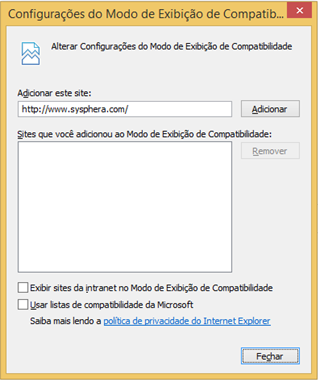
- In the Menu bar, click on "Tools," then click on "Compatibility View settings."
- In the popup that appears, uncheck all the checkboxes and click "Close."
¶ 2.3.2 Security and Privacy
Depending on the environment configuration, company network structure, or security concerns, Internet Explorer may treat "Local Intranet" sites as if they were external or Internet sites. This can restrict the security level for running scripts, opening pop-ups, and various other functionalities.
Since T6 Planning always operates within the company's intranet, it is necessary to add the T6 Planning solution address to the Local Intranet, avoiding these restrictions.
For this configuration, follow these steps:
- Open Internet Explorer.
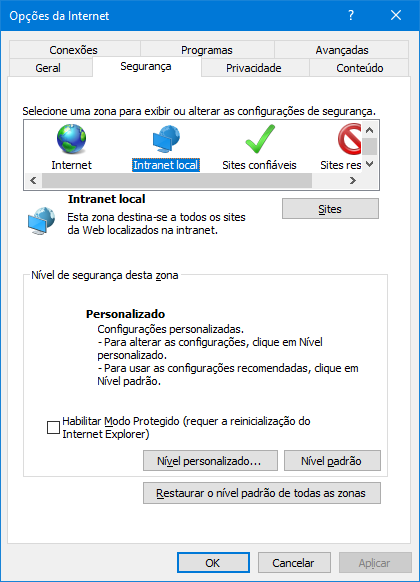
- In the Menu bar, click on the "Tools" button, then click on "Internet Options."
- In the "Internet Options" popup:
- Click on the "Security" tab, choose the "Local Intranet" security zone, and then click on "Sites."
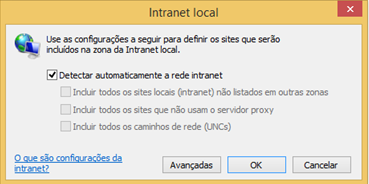
In the Local Intranet popup:
- Keep the "Automatically detect intranet network" option selected.
- Then click on "Advanced."
Still in the Local Intranet popup:
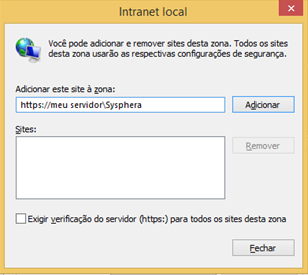
- In the "Add this website to the zone" field, enter the T6 Planning solution address. Example: http://my_server/Sysphera.
- Then click on "Add."
- Uncheck the "Require server verification (https:) for all sites in this zone" checkbox.
- Finally, click on "Close."