¶ 1. Overview
The Cube Context is a feature that allows you to reuse recurring configurations across different parts of the product, aiming to avoid rework and ensure consistency in building entries and analyses.
In several scenarios, certain parameters are frequently repeated — for example, when launching a fixed expense, the "Product" field is always filled as Not applicable. Before Cube Context, this kind of information had to be manually repeated for each entry, leading to unnecessary effort and an increased risk of inconsistencies.
Cube Context solves this problem by acting as a reusable template: it allows saving a partial cube configuration (such as filters, default values, or fixed dimensions), which can be quickly applied in different areas of the application.
¶ 1.1. Prerequisites
To be able to create and use Cube Contexts, the user must have the following Features enabled:
The user's Manager functionalities:
Be associated with a Global Group with the feature:
¶ 2. Usability
Cube Context is designed to provide speed, consistency, and configuration reuse within T6. By centralizing recurring definitions in a single place, it reduces the need for repetitive manual parameterizations and ensures uniformity in analysis and allocation processes.
¶ 2.1. How to create a cube context?
You can create a cube context directly through the T6 interface by following the steps below:
-
Access T6 Explorer
- In the T6 main menu, click on Explorer.
-
Choose the creation location
- Navigate to the desired directory (folder, project, or application) where the context will be saved.
-
Start item creation
- In the top ribbon, click on New Item.
- Expand the Modeling option and select Cube Context.
-
Configure the context in the side panel
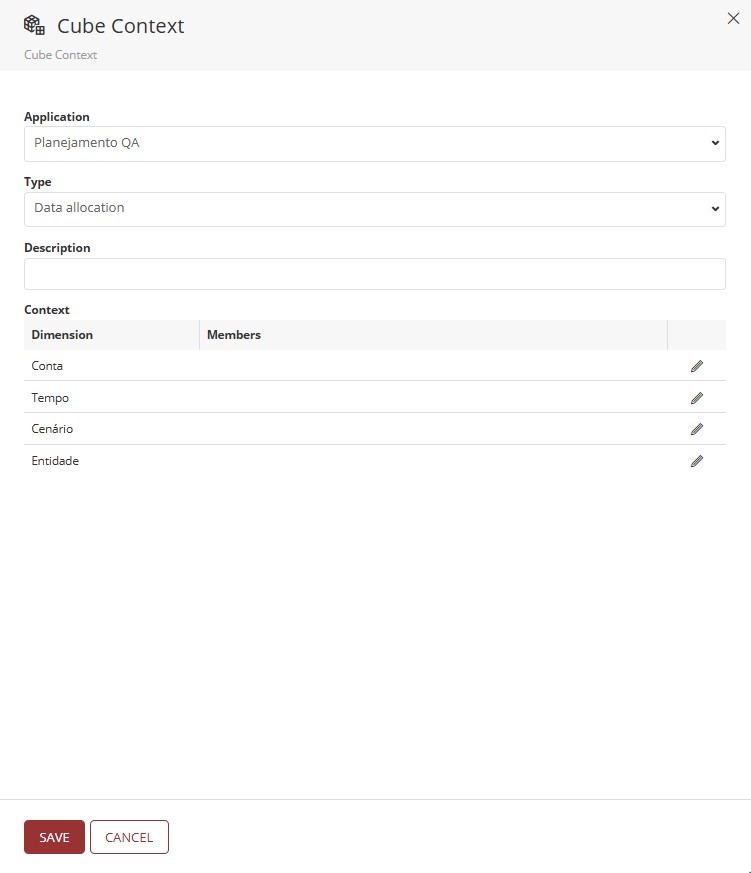
- The creation panel will appear on the right side of the screen with the following fields:
-
Application
Dropdown to select the base application. This selection is mandatory, as the context depends on the dimensions of the chosen application. -
Type
Dropdown with the following options:Data AllocationDriver Analysis
This selection defines the context category for later filtering.
-
Description
Text field to enter a clear and objective description of the context’s use or purpose. -
Context
Table with two columns:- Dimension (fixed): lists the application dimensions.
- Members: editable field to select the members associated with the dimension.
Use the pencil icon to open the member selection screen.
-
Select dimension members
-
When clicking the pencil icon, a screen will appear with options to add members:
- Hierarchy: select the desired hierarchy.
- Aggregation: select the aggregation level.
- Member list: select the desired members for that dimension.
-
-
Save or cancel
- Click Save to finish creating the context.
- Click Cancel to discard the changes.
The cube context only takes effect after the cube is published.
After creating a new Cube Context, if there are no changes in the application structure, it will be necessary to force a cube publication. To do this, go to the "Designer" section, select the application where the cube context was created, and click "Save". This will allow the cube to be published and the context to be used.
¶ 3. Application Areas
The Cube Context can be applied in two main T6 modules:
The correct application depends on the type of context created (Driver Analysis or Data Allocation).
¶ 3.1. Profitability Analysis
To apply a cube context of type Driver Analysis:
- Access Explorer from the main menu.
- In the top ribbon, click on New Item.
- Expand the Analysis section.
- Select the Profitability Analysis option.
The cube context will be used as a base to define the analysis parameters, ensuring that filters and dimensions are pre-configured according to the defined standard.
For additional instructions, see: Profitability Analysis.
¶ 3.2. Data Allocation
To apply a cube context of type Data Allocation:
- Access Explorer from the main menu.
- Navigate to the Cube Form where the allocation will be performed.
- Apply the cube context as a base to preconfigure the entry dimensions.
This approach streamlines the allocation process by avoiding manual filter configuration and ensuring consistency with the defined modeling.
For more details, visit: Data Allocation.
¶ 4. Q&A
Frequently Asked Questions
1. What is Cube Context?
Cube Context is a T6 feature that allows you to reuse recurring configurations, such as filters and default values, avoiding rework and ensuring consistency in data entry and analysis.
2. What are the prerequisites to create a Cube Context?
To use cube context, you need to have the Manager features Manage application structure/model and Create and view data entry forms enabled and be associated with a Global Group with the Manage Explorer feature enabled.
3. How to create a Cube Context in T6?
To create a Cube Context in T6, follow these steps:
- In the Main Menu of T6, access the Explorer;
- Choose the directory where the cube context will be created and click New Item in the ribbon;
- In the Modeling section, select the Cube Context option;
- A side panel will open. Configure the fields and select the members of each dimension;
- Click Save to complete the cube context creation.
4. Does the Cube Context take effect immediately after creation?
No. The cube context only takes effect after cube publication. If there are no structural changes, it is necessary to force the publication.
5. Where can the Cube Context be applied?
Cube context can be applied in the Profitability Analysis and Data Allocation modules, depending on the type of cube context created.
6. What is the difference between the cube context types, Data Allocation and Profitability Analysis?
Data Allocation is used to pre-configure dimensions in data entries;
Profitability Analysis is used to define parameters in profitability analyses.
7. How to select members for a dimension when creating the cube context?
To select members for a dimension, click on the pencil icon next to the dimension, choose the hierarchy, aggregation, and select the desired members.
8. What happens if the application structure changes after creating the cube context?
If the structure has been changed, it will be necessary to publish the cube again so that the context reflects the changes in the structure.
9. Why use Cube Contexts?
Use cube context to streamline processes, ensure consistency, and avoid repetitive manual parameterizations in different areas of T6.