¶ 1. Overview
A Cube is a multidimensional structure used in analytical data modeling (OLAP), which organizes information across multiple dimensions. Each dimension represents an analysis axis (such as Account, Time, Entity, Scenario, etc.) and may contain one or more hierarchies.
Hierarchies define the aggregation levels within the dimension — for example, in the Time dimension, the hierarchy may be: Year → Semester → Quarter → Month. Each member of the dimension belongs to a hierarchical level and is logically related to others, allowing navigation between levels (drill-up / drill-down).
The cube enables complex, high-performance analysis by crossing facts with various combinations of dimensions and hierarchical members.
¶ 1.1. Prerequisites
To allow a user to publish a cube, they must have the following Manager Feature enabled:
Or, be associated with an Application Group that has the following Manager Feature enabled:
¶ 2. Cube Structure
The Cube consists of a list of dimensions, which organize data hierarchically and enable different analysis perspectives on system facts.
¶ 2.1. Base Dimensions
The cube has four fundamental dimensions, present in any application instance:
- Account
- Scenario
- Entity
- Time
Each of these dimensions may contain one or more hierarchies, and each hierarchy consists of a list of members. You can also create as many dimensions as necessary.
Additionally, each dimension has a list of attributes. An attribute is defined by its name and data type (e.g., text, number, boolean, date, etc.). Each dimension member can carry a specific value for each attribute.
For example:
In theAccountdimension, there may be an attributeRevenuewith aggregation type+(positive) and an attributeExpensewith aggregation type-(negative). For each member in the dimension, you can select the attribute that best fits.
¶ 2.2. Hierarchies and Members
- A hierarchy defines the levels of aggregation or detail of the members.
- Members represent the analytical elements (e.g., Revenue, Expense, Month, Year, etc.).
- Duplicate names may exist within a hierarchy, which requires a unique identifier via ID or UniqueID.
¶ 3. Cube States
Each application may contain two distinct cube states:
- Valid Cube: the current state of the cube, still under editing.
- Published Cube: the version of the cube synchronized with the database.
When saving a cube, the system never overwrites the previous record. Instead, a new object is created and stored in the database table REP_XML.
¶ 3.1. History and Restore
T6 maintains a complete version history of the cube per application, allowing:
- Exporting a previous version.
- Reverting a valid cube.
For more information, see: Security - Audit
¶ 4. Cube Publication
Publishing the cube consists of materializing the contents of REP_XML into the physical tables of the application's database.
¶ 4.1. Dimension Materialization
Each dimension is converted into a table in the database.
These tables are generated only at the time of publication, and the application starts consuming them directly in forms, screens, and analytical queries.
¶ 4.2. Fact Table
Each application has a single fact table.
This table stores the transactional data (numerical values) and is related to the dimensional tables. Dimensions provide structure and semantics, while the fact table holds the quantitative data (values in cells).
¶ 4.3. When to Publish
Cube publication is mandatory when there are structural changes in the XML, such as:
- Creation/removal of dimensions or members;
- Changes in hierarchies;
- Inclusion of attributes.
Changes that do not involve the structure of the cube (e.g., adding values to cells) do not require publication.
To perform the first publication of the cube in T6, an application must be created and members added to the
timedimension.
¶ 4.3.1. Step-by-Step
After creating your application and adding members to the time dimension, follow these steps to publish the cube:
-
Access the main T6 menu.
- Expand the Modeling section;
-
In the Modeling section, click on Publish.
- The following confirmation message will be displayed:
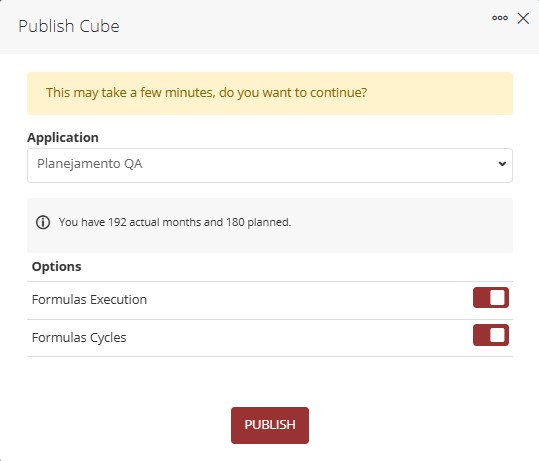
- There is a dropdown for Application selection;
- A switch button Formula Execution — when enabled, all formulas linked to the application will be executed before publication;
- A switch button Formula Cycles — when enabled, existing formulas will be executed respecting dependencies or interactions before proceeding with publication;
-
To publish the selected application's cube, click Publish;
- Upon clicking Publish, the following popup will be displayed:

After a short period, a new notification will be generated, informing the success of the cube publication (click for more details regarding Notifications):

Cube publication is done individually per application, and it is not possible to select more than one application per publication.
If there are no changes in the cube structure, the following message will be displayed when attempting publication:

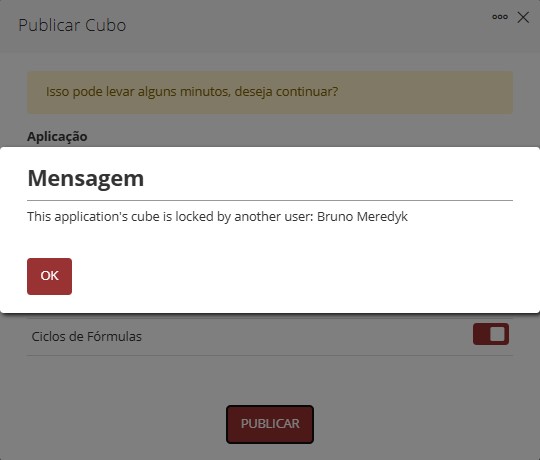
Another action that prevents cube publication is the cube being locked by another user. Attempting to publish a locked cube will result in the following message:
¶ 5. Q&A
Frequently Asked Questions
1. What is a cube in the context of T6?
A cube is a multidimensional structure used in analytical data modeling (OLAP) that organizes information through various dimensions such as Account, Time, Entity, and Scenario, allowing complex and high-performance analyses.
2. What are the mandatory dimensions of a cube?
Every cube has four fundamental dimensions: Account, Scenario, Entity, and Time.
3. What is the difference between Valid Cube and Published Cube?
The Valid Cube is the current state of the cube still being edited, while the Published Cube is the version synchronized with the database and available for use.
4. What permissions do I need to publish a cube?
To publish a cube in T6, you need to have the manager feature Manage application structure/model enabled or be associated with an Application Group with the same feature enabled.
5. Is it possible to recover previous versions of the cube?
Yes, T6 maintains a complete history of versions (Model History), allowing you to export previous versions or revert a valid cube.
6. When is it necessary to publish the cube?
Cube publication is mandatory when there are structural changes such as creating/removing dimensions or members, changes in hierarchies, or inclusion of attributes. Changes that do not involve structure (such as adding values) do not require publication.
7. Can I publish the cube of multiple applications simultaneously?
No, cube publication is performed individually per application; it is not possible to select more than one application per publication.
8. What happens if I try to publish a cube without changes?
The system will display a message informing that there are no structural changes to publish.
9. Why can't I publish my cube?
Possible reasons include: not having the appropriate permissions, no structural changes to publish, or the cube being locked by another user.
10. What should I do if the cube is locked by another user?
Wait for the user to release the lock or contact the system administrator to check the lock status.
11. Can I unlock a cube locked by another user?
Yes, but you need to have the manager feature Unlock Cube locked by another user enabled.
12. How does the storage of cube versions work?
The system never overwrites previous records. Each save creates a new object in the REP_XML table, maintaining complete history.
13. What are the minimum prerequisites for the first publication?
It is necessary to create an application and add members in the Time dimension before you can perform the first cube publication.